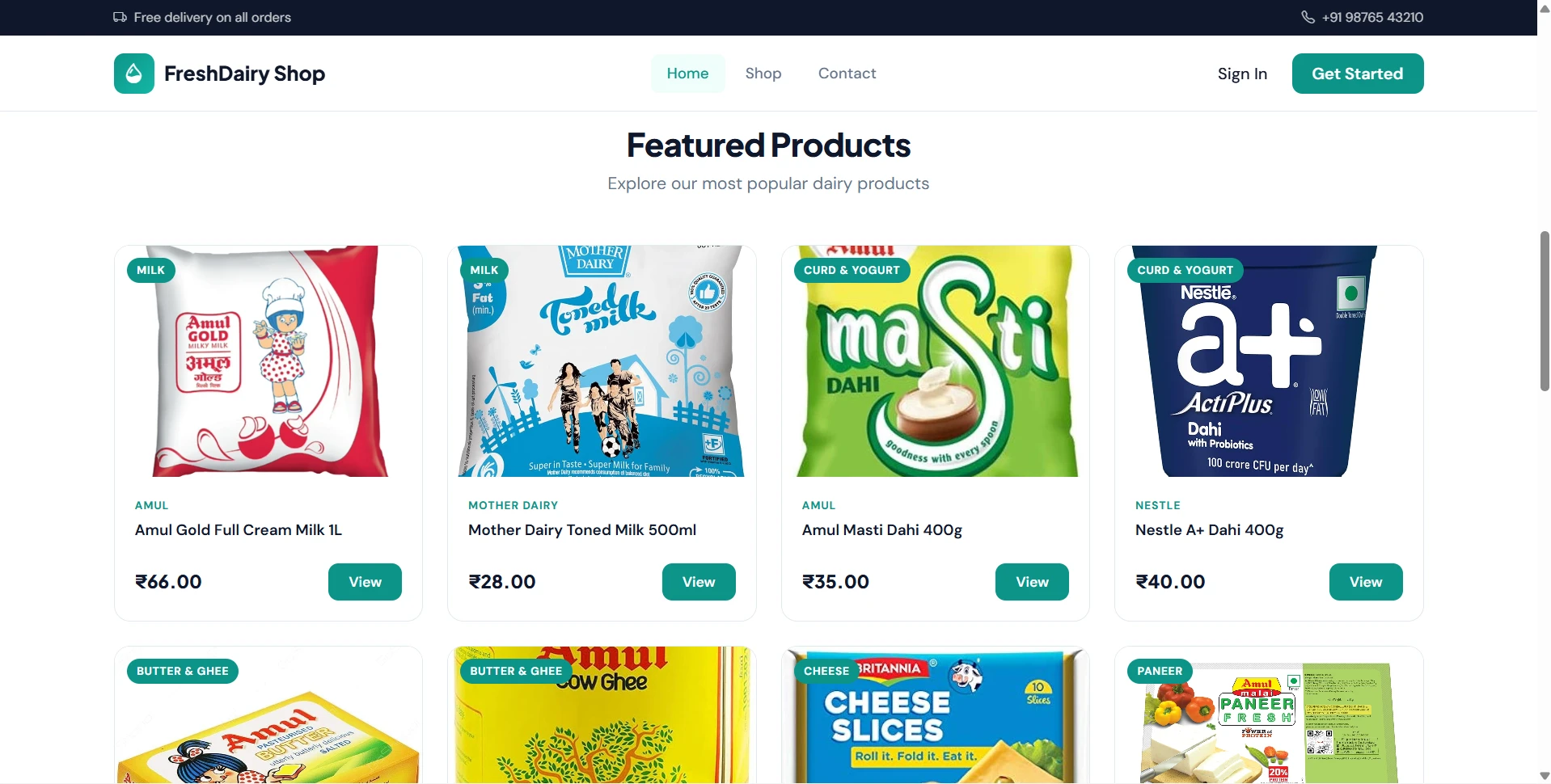
Dairy Farm Shop Management System Using PHP and MySQL | Source Code
LIMITED TIME
Get Source Code ₹99
Open Live Demo
Real project UI Full source included Opens in new tab

Tap to open live demo

Interactive live demo — verify the project before you buy

Dairy Farm Shop Management System Using PHP and MySQL

Live Demo

Complete final-year project source code with frontend, backend, database, and setup guide. Instant download after secure payment.

  • PHP Stack
  • Instant Download
Secure CCAvenue payment Instant download link WhatsApp support

Choose your plan

Source Code Only

Full ZIP with frontend, backend, database & documentation.

₹99 one-time
  • Complete project source files
  • Database script included
  • How-to-run guide

What's in your download

Review features, setup steps, and credentials before you pay.

Project Overview

Description, tech stack, and what is included

Full source Frontend + backend
Database .sql file
Setup guide README included

Online Dairy Farm Shop Management System is a PHP and MySQL based final year project developed for managing dairy product sales and shop operations online. This minor project includes a public storefront, user panel, and admin panel. Customers can register, browse dairy products, search and filter products by category or brand, add products to cart, place Cash on Delivery orders, track order status, submit enquiries, give feedback, and manage profile details. Admins can manage brands, categories, products, stock, customers, orders, COD payments, enquiries, feedback, contact messages, reports, profile, and password settings. This online dairy farm shop management source code is suitable for students who need a final year project, major project, minor project, source code, and project report based on PHP and MySQL.

Technical snapshot

Project
Dairy Farm Shop Management System Using PHP and MySQL
Stack
PHP
Includes
Code, DB, README
License
Academic submission
Secure CCAvenue payment · Instant download · Need help? WhatsApp us

Ready to download?Pay once · Use for submission & viva

Admin Features

Modules and controls available to administrators

  • Admin login and logout
  • Admin dashboard with active products, customers, pending orders, revenue, total orders, low stock, and pending enquiries
  • Brand CRUD management
  • Add brand
  • Edit brand
  • Delete brand
  • Activate/deactivate brand
  • Search brands
  • Category CRUD management
  • Add category
  • Edit category
  • Delete category
  • Search categories
  • Product CRUD management
  • Add dairy product
  • Edit dairy product
  • Delete product and uploaded image
  • Upload product image
  • Manage product price and quantity
  • Update stock manually
  • Add or subtract stock quantity
  • Activate/deactivate products
  • Search products by name
  • Filter products by category and brand
  • Low stock indicator for products below 20 units
  • Customer management
  • View registered customers
  • View customer profile and order history
  • Activate/deactivate customer accounts
  • Search customers by name, email, or phone
  • Order management
  • View all orders
  • View order details
  • Update order status: Pending, Confirmed, Delivered, Cancelled
  • Update payment status: Pending, Paid, Failed
  • Search orders by order number or customer name
  • Filter orders by status
  • Stock deducted on confirmed orders
  • Stock restored on cancelled orders
  • COD payment management
  • View Cash on Delivery payments
  • Mark COD payments as paid
  • Filter payments by pending, paid, or failed
  • Pending COD collection summary
  • Enquiry management
  • Reply to customer enquiries
  • Delete enquiries
  • Filter pending/replied enquiries
  • Feedback management
  • View customer ratings and reviews
  • Delete feedback
  • Contact message management
  • View public contact form messages
  • Delete contact messages
  • Sales report
  • Product report
  • Customer report
  • Order report
  • Stock report
  • Print reports
  • Admin profile update
  • Admin password change

User Features

What end users can do in this application

  • User registration
  • User login and logout
  • Account status check
  • User dashboard with total orders, pending orders, delivered orders, and total spent
  • View recent orders
  • Profile view and update
  • Change password
  • Browse dairy products
  • View product listing in grid format
  • View product details
  • Search products by product name
  • Filter products by category
  • Filter products by brand
  • View related products
  • Add products to cart
  • Update cart quantity
  • Remove products from cart
  • Cart stock validation
  • View order summary
  • Checkout with delivery details
  • Place Cash on Delivery order
  • View order success page
  • Track order status
  • View order history
  • View order details
  • Cancel pending order
  • Search orders by order number
  • Filter orders by status
  • Submit enquiry to admin
  • View own enquiries
  • Edit pending enquiries
  • Delete pending enquiries
  • View admin replies
  • Submit feedback with star rating
  • View submitted feedback
  • Delete own feedback
  • Contact admin through contact page

Other Features

Additional capabilities included in the project

  • Complete online dairy farm shop management source code
  • Suitable for final year project, major project, and minor project
  • Project report content can be prepared from included modules
  • Public Storefront, User Portal, and Admin Panel
  • Product image upload support
  • Product image formats: JPG, PNG, GIF, WebP
  • Product stock validation
  • COD order processing
  • Order status tracking
  • Payment status tracking
  • Customer enquiry and reply system
  • Customer feedback and rating system
  • Business reports with print support
  • PDO prepared statements
  • Password hashing using password_hash() and password_verify()
  • Session-based authentication
  • Input sanitization using htmlspecialchars()
  • Admin and user protected areas
  • No Laravel, CodeIgniter, or PHP framework
  • No React, Vue, or Angular
  • No third-party payment API
  • No external REST API
  • One-click install.php database installer
  • Seed data with admin, users, brands, categories, products, orders, enquiries, feedback, and contact messages
  • Useful for viva, source code review, project report writing, and project demonstration

How to Run

Step-by-step setup on your laptop or PC

  • Copy the project folder into:


    C:\xampp\htdocs\Dairy Farm Shop Management System\
  • Start Apache and MySQL from XAMPP.
  • Open installer:


    http://localhost/Dairy%20Farm%20Shop%20Management%20System/install.php
  • Click Install Database.
  • Edit database configuration if needed:


    config/database.php
  • Set database details:


    define('DB_HOST', 'localhost');
    define('DB_USER', 'root');
    define('DB_PASS', '');
    define('DB_NAME', 'dairy_farm_shop');
  • Ensure product upload folder exists and is writable:


    uploads/products/
  • Delete install.php after successful installation.
  • Open application:


    http://localhost/Dairy%20Farm%20Shop%20Management%20System/

Login Credentials

Default demo accounts for testing after setup

Admin

Sample User

All sample users use password: user123

License

Usage terms for academic and personal projects

Related Tags

Search terms and categories for this source code

Dairy Farm Shop Management System Using PHP and MySQL Source Code Final Year PHP Project Ready-to-Run Code With Database File Plagiarism-Free Faculty Approved final year project major project minor project source code project report online dairy farm shop management dairy farm shop management system PHP MySQL final year project dairy shop project source code online dairy product selling system milk product management project dairy ecommerce project FreshDairy Shop source code COD order management system dairy product stock management PHP project report