Video Streaming Platform Architecture: Complete Guide for OTT Apps and Final-Year Projects
If you want to build a Netflix-like app, an OTT demo, or a strong final-year project, you need more than a homepage and video player. You need to understand how the full system works.
Quick Answer
A video streaming platform architecture is the system design that handles video upload, transcoding, storage, metadata, delivery, playback, security, and analytics. In practice, most modern platforms use object storage, a transcoding pipeline, HTTP-based adaptive streaming, and a CDN so users can watch the best quality their network can support. Apple’s HLS model is designed to work over ordinary web servers and CDNs and adapts playback to changing bandwidth conditions.
What Is Video Streaming Platform Architecture?
Video streaming platform architecture defines how a platform ingests media, converts it into streamable formats, stores video files and metadata, delivers content to users, and tracks playback performance.
At a high level, the architecture has two sides:
- Content side: upload, processing, packaging, storage, publishing
- Viewer side: authentication, catalog browsing, playback, analytics, access control
For a student project, you do not need Netflix-scale infrastructure. But you do need to show the correct system layers, because that is what makes your project technically sound and viva-ready.
Video Streaming Architecture Diagram Explained
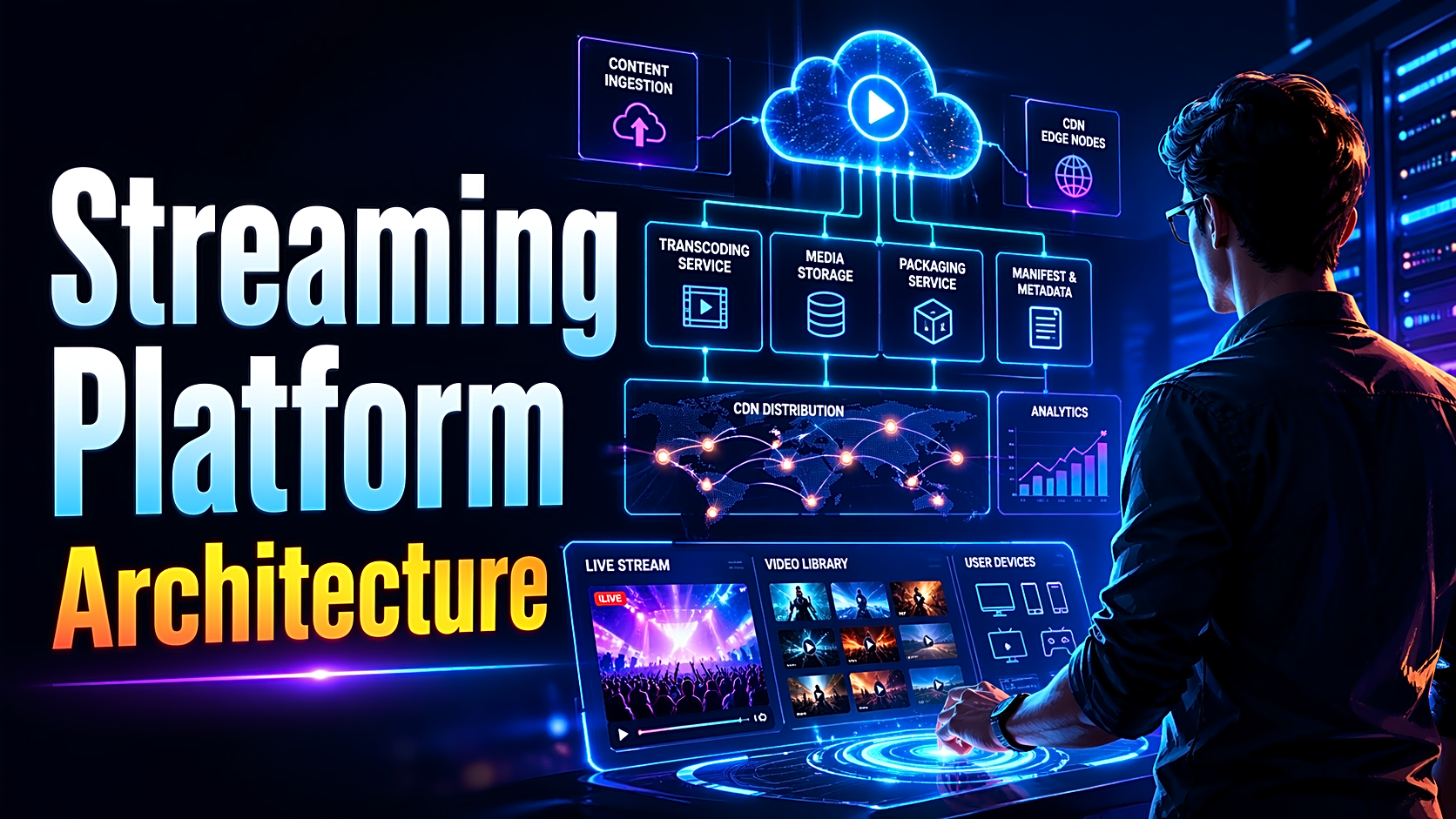
A typical OTT platform architecture looks like this:
- Client app
Web, mobile, or TV interface where users browse and watch content. - API/backend
Handles login, content catalog, watchlists, search, subscriptions, and playback authorization. - Admin/upload service
Lets admins upload raw videos, thumbnails, titles, descriptions, genres, and banners. - Transcoding and packaging pipeline
Converts the original video into multiple resolutions and bitrates, then generates manifests and media segments. - Storage layer
Stores source files, processed outputs, thumbnails, subtitle files, and manifests. - Metadata database
Stores titles, categories, cast, users, watch history, analytics events, and content permissions. - Origin + CDN delivery layer
The origin stores stream assets; the CDN caches them at edge locations for faster delivery. - Player and playback logic
Requests the manifest, loads segments, buffers content, and adjusts quality dynamically. - Analytics and monitoring
Tracks view count, watch time, buffering, drop-off points, and playback errors.
Core Components of a Video Streaming Platform
1. Client application
This is the frontend users interact with. It usually includes:
- sign up and login
- browse categories
- search
- watchlist
- continue watching
- ratings or reviews
2. Authentication and access control
This layer decides who can watch what. For student builds, JWT-based authentication is enough. For advanced systems, access control may also include subscription validation, tokenized playback, and signed URLs.
3. Content management and admin panel
A serious project needs an admin interface to:
- upload media
- manage metadata
- organize categories
- publish/unpublish titles
- manage banners and featured content
4. Video ingestion and upload workflow
Once a video is uploaded, the system stores the source file and triggers processing. AWS’s reference VOD workflow uses a staged ingest, processing, and publishing flow to build scalable video-on-demand pipelines.
5. Transcoding pipeline
Raw videos are rarely suitable for direct delivery. The processing layer creates different output versions such as 360p, 720p, and 1080p. This is where tools like FFmpeg or services like AWS Elemental MediaConvert fit in. MediaConvert is built specifically for file-based video processing for streaming and multiscreen delivery.
6. Storage layer
You usually need both:
- Object storage for videos, thumbnails, subtitle files, manifests, and segments
- Relational database for metadata, users, categories, watch history, subscriptions, and reviews
7. Streaming delivery layer
Modern streaming platforms avoid sending large video files directly from the application server. Instead, they deliver packaged media through a CDN for lower latency, better reliability, and better scaling.
8. Player and playback logic
The player loads the manifest, selects a bitrate, buffers segments, and switches quality as bandwidth changes. That is the basis of adaptive bitrate streaming.
9. Analytics and observability
Basic analytics are not enough for production. A stronger architecture also tracks:
- startup time
- rebuffering rate
- average watch duration
- playback failures
- exit points
- device type
- network conditions
These are often called QoE metrics because they describe the viewer’s quality of experience.
How the Upload-to-Playback Workflow Works
Here is the simplified video streaming workflow:
- Admin uploads a raw video.
- The source file is stored in object storage.
- A transcoding job creates multiple renditions.
- The system generates manifests and media segments.
- Metadata is saved in the database.
- Stream assets are published to the origin.
- The CDN caches popular segments at edge locations.
- A user opens the app and selects a title.
- The player requests the manifest and starts playback.
- Analytics events are logged during the session.
This sequence is the backbone of any video streaming system design article or project report.
HLS vs MPEG-DASH: Which One Should Students Mention?
|
Protocol |
Best For |
Strengths |
Limitations |
|
HLS |
Most student projects and broad device compatibility |
Common, CDN-friendly, adaptive, easy to explain |
Slightly more Apple-centered historically |
|
MPEG-DASH |
Standards-heavy or advanced implementations |
Flexible, widely used, good to mention in system design |
Slightly more complex to explain in viva |
Recommendation:
If your project is academic, mention HLS first because it is easier to explain. Apple describes HLS as HTTP-based streaming that works with ordinary web servers and CDNs while adapting to network conditions.
VOD vs Live Streaming Architecture
|
Type |
Main Characteristic |
Architecture Difference |
|
Video on Demand (VOD) |
Users watch pre-uploaded content |
Transcoding happens before playback |
|
Live Streaming |
Users watch an ongoing broadcast |
Ingest, encode, package, and deliver in near real time |
For a final-year project, VOD architecture is the better scope. It is easier to implement, easier to demo, and easier to document clearly.
Security Layer: DRM, Signed URLs, and Access Control
A realistic streaming platform backend architecture should mention security, even if you do not fully implement it.
Minimum academic version
- login and session control
- role-based access for admin and users
- protected playback routes
Better version
- signed URLs for stream access
- short-lived tokens
- playback authorization checks
- hidden storage paths
Production-grade version
- DRM
- geo restrictions
- entitlement service
- watermarking
- device/session concurrency control
This section matters because many student projects ignore security entirely, which makes the architecture look incomplete.
Recommended Tech Stack for a Final-Year Project
|
Layer |
Student-Friendly Choice |
Advanced Choice |
|
Frontend |
React / HTML-CSS-JS |
React / Next.js |
|
Backend |
Node.js, PHP, Flask |
Node.js microservices |
|
Database |
MySQL / PostgreSQL |
PostgreSQL + cache |
|
File storage |
Local storage |
S3-compatible object storage |
|
Transcoding |
FFmpeg |
MediaConvert / dedicated workers |
|
Delivery |
Direct file serving |
CDN + HLS |
|
Auth |
JWT |
JWT + tokenized playback |
If you are still deciding what to build, link this section naturally to final year project ideas and source code for final year projects.
How to Scope the Project Properly
Minor project
- login
- admin upload
- local video playback
- metadata management
Strong final-year project
- admin panel
- object storage
- HLS playback
- categories
- search
- watchlist
- history
- analytics dashboard
Advanced demo project
- multi-quality streaming
- CDN-ready architecture
- subtitle support
- signed URL logic
- recommendation module
How to Explain This Architecture in Viva
Use this 1-minute answer:
“Our video streaming platform architecture has two main flows: content ingestion and user playback. On the content side, the admin uploads videos, the system processes them into multiple qualities, stores them in object storage, and publishes them for streaming. On the viewer side, users browse metadata from the database, authenticate through the backend, and stream videos through a player that reads the manifest and loads the correct quality level. We also track watch history and analytics to make the platform more complete.”
Common viva questions
- Why do we transcode videos instead of storing one MP4 only?
- Why is a CDN better than serving files directly from the backend?
- What is the role of a manifest file in HLS?
- What is the difference between metadata and media storage?
- Why is VOD easier to build than live streaming?
Expert Tips to Make the Article and Project Stronger
- Add one architecture diagram and one upload-to-playback sequence diagram.
- Use the terms adaptive bitrate streaming, manifest, segments, and CDN edge caching correctly.
- Avoid claiming “Netflix-level scale” unless your project actually uses a scalable delivery model.
- Mention codec efficiency as a future-scope point. Netflix said AV1 powered about 30% of its streaming in late 2025, which is a strong example of why codec and delivery optimization matter.
- Add a “future scope” section with subtitles, DRM, offline downloads, recommendations, and monetization.
FAQ
What is video streaming platform architecture?
It is the system design that handles upload, processing, storage, delivery, playback, and analytics for a streaming application.
How does a video streaming platform work?
It uploads a source file, transcodes it into streamable formats, stores the assets, delivers them through a CDN, and lets the player fetch segments based on network conditions.
Why is CDN used in video streaming?
A CDN improves speed and reliability by serving cached content from edge locations closer to users.
What is HLS in streaming?
HLS is an HTTP-based adaptive streaming format that uses manifests and segments to deliver video efficiently across different network conditions.
What is the difference between a Netflix clone and a real streaming platform?
A clone may copy the interface. A real platform includes backend services, upload flow, transcoding, metadata, delivery, security, and analytics.
Which database is best for a student streaming project?
MySQL or PostgreSQL is usually enough for users, metadata, categories, watch history, and reviews.
Should students choose VOD or live streaming?
VOD is the better choice for most final-year projects because it is easier to implement and present.
Conclusion
A strong video streaming platform architecture is not just about playing videos. It is about showing the entire system: upload, processing, storage, metadata, delivery, playback, security, and analytics.
If your goal is a high-quality final-year project, build a realistic VOD version, explain the architecture clearly, and support it with diagrams, workflow tables, and a strong viva explanation. That is what turns a simple clone into a technically credible OTT-style project.
Next step: guide readers toward a related Netflix Clone project report, source code for final year projects, or live demo projects.